
The Threshold Monitoring app is primarily a Stripe marketplace app which adds additional UI elements to the Stripe dashboard. By default, the app opens to the Overview tab.
 The Overview tab
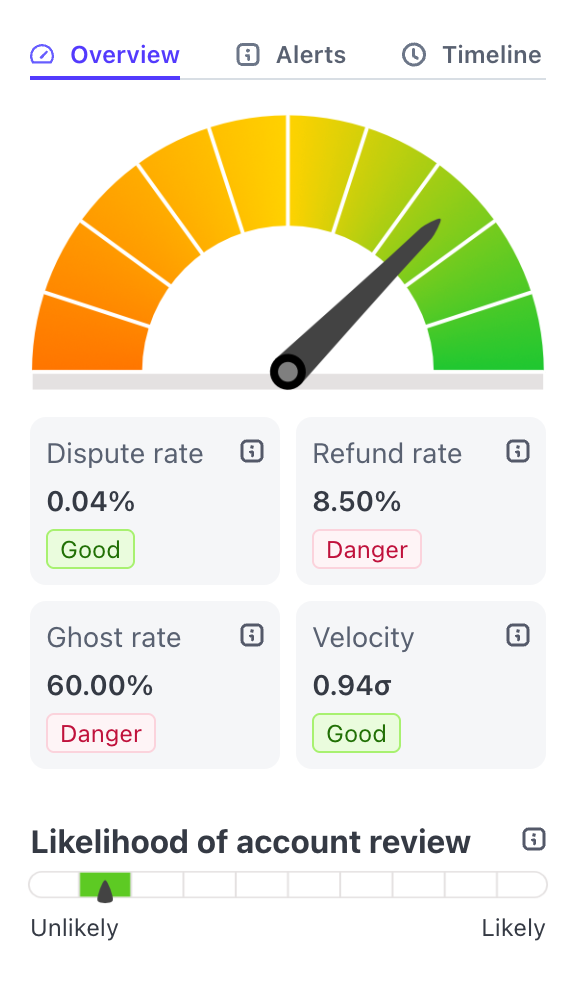
The graph at the top of the Overview tab shows your current account health score. The greener the color the needle is pointing to, the healthier your account is. Threshold helps bring items to your attention that you might miss if you were just browsing through the Stripe dashboard pages.
Below the score gauge are the weighted stats that affect your score the most.
Dispute Rate
Dispute rate should be kept as low as possible, under 0.5%. As you near the thresholds specified by Stripe, your health score will start to drop. The Threshold app also monitors the dispute rate velocity, which can be an early indicator of a problem with your website, product descriptions, or customer service process.
Refund Rate
A high refund rate can indicate an issue with a particular product, misleading images or descriptions, or an unclear policy. However, refunds are a great tool to prevent disputes, and should be used to help unhappy customers feel like they've been treated fairly. Refund rate doesn't affect your score as much as dispute rate. The Threshold app monitors many aspects of refunds including the speed of a refund after purchase, partial vs full refund rates, the percentage based on volume vs count, and the refund+dispute rate.
Ghost Rate
A transaction without address verification information can be a risky one, and Threshold refers to these as "ghost transactions". It is best practice to collect some information from the cardholder to help ensure the card is more than just a number to them. Allowing transactions with only a card number, (or card and zip code), makes it easier for fraudsters to exploit stolen cards. Improve this score by increasing the information you collect for each transaction (while still making checkout smooth - a tricky balance!)
Velocity
There are many velocities that Threshold monitors, one of which is volume threshold. This score is a sigma value - based on standard deviation from your usual volume. A sudden spike in velocity can indicate many things ranging from fraud to a successful marketing campaign. Either way, context should be added for these anomalies whether in your own records or in the Threshold Monitoring alerts tab.
Likelihood of account review
One of the most common worries among Stripe users in forums is missing a deadline on an unexpected Stripe account review. Stripe reviews are a normal part of the distributed underwriting model that Stripe uses, and are an opportunity to share some of your business details with stripe. The information you may need to provide will depend on what initiated the review. Sometimes it's just passing an income milestone, which is cause for celebration! This gauge is our best guess on the likelihood of needing to provide documentation to Stripe. As this score rises, you'll see additional tips about what you can do to prepare.
If you consistently monitor the Threshold Overview tab, you should be well informed about your account, as know that something needs attention before it becomes a problem.
Threshold subscribers can sign up for daily or weekly email alerts so they don't even need to log in to Stripe, and also can be notified if we detect an anomalies in real-time.
To learn more about the stats we collect see the App Overview - Advanced Metrics guide.
The Overview tab
The graph at the top of the Overview tab shows your current account health score. The greener the color the needle is pointing to, the healthier your account is. Threshold helps bring items to your attention that you might miss if you were just browsing through the Stripe dashboard pages.
Below the score gauge are the weighted stats that affect your score the most.
Dispute Rate
Dispute rate should be kept as low as possible, under 0.5%. As you near the thresholds specified by Stripe, your health score will start to drop. The Threshold app also monitors the dispute rate velocity, which can be an early indicator of a problem with your website, product descriptions, or customer service process.
Refund Rate
A high refund rate can indicate an issue with a particular product, misleading images or descriptions, or an unclear policy. However, refunds are a great tool to prevent disputes, and should be used to help unhappy customers feel like they've been treated fairly. Refund rate doesn't affect your score as much as dispute rate. The Threshold app monitors many aspects of refunds including the speed of a refund after purchase, partial vs full refund rates, the percentage based on volume vs count, and the refund+dispute rate.
Ghost Rate
A transaction without address verification information can be a risky one, and Threshold refers to these as "ghost transactions". It is best practice to collect some information from the cardholder to help ensure the card is more than just a number to them. Allowing transactions with only a card number, (or card and zip code), makes it easier for fraudsters to exploit stolen cards. Improve this score by increasing the information you collect for each transaction (while still making checkout smooth - a tricky balance!)
Velocity
There are many velocities that Threshold monitors, one of which is volume threshold. This score is a sigma value - based on standard deviation from your usual volume. A sudden spike in velocity can indicate many things ranging from fraud to a successful marketing campaign. Either way, context should be added for these anomalies whether in your own records or in the Threshold Monitoring alerts tab.
Likelihood of account review
One of the most common worries among Stripe users in forums is missing a deadline on an unexpected Stripe account review. Stripe reviews are a normal part of the distributed underwriting model that Stripe uses, and are an opportunity to share some of your business details with stripe. The information you may need to provide will depend on what initiated the review. Sometimes it's just passing an income milestone, which is cause for celebration! This gauge is our best guess on the likelihood of needing to provide documentation to Stripe. As this score rises, you'll see additional tips about what you can do to prepare.
If you consistently monitor the Threshold Overview tab, you should be well informed about your account, as know that something needs attention before it becomes a problem.
Threshold subscribers can sign up for daily or weekly email alerts so they don't even need to log in to Stripe, and also can be notified if we detect an anomalies in real-time.
To learn more about the stats we collect see the App Overview - Advanced Metrics guide.